Australian Wills Families - - Search engines
it is the way that you ask it, especially in researching your family tree.
In searching for a person there are several rules to apply.
|
Searching an individual Web page |
To search this, or any other web page, hold down the Ctrl key (lower left corner of the Key board) and press the "F" key. A "Find" window will open, similar to the one below. Type in one of the Christian names you are seeking and continue pressing the Enter key as the search proceeds through the list. Also try entering the required year of birth or death in the Find window for more searching.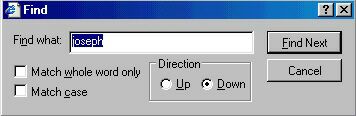
|
Searching the Wills Family pagesThis search engine is designed to search my internet pages at http://tww.id.auMy pages also contain information on Folklore Weather Forecasting, Boating, Proverbs and others subjects therefore you may find an unusual answer to your search. But try it any way, the worst that can happen is that you will not find anything. |
Searching the Entire InternetClick the Google logo to open the Google search engine
|
TOP